
The 15 Most Important Technologies of the Last 15 Years – #8: eBooks
The technology for putting text on computer displays has existed for a very long time. In fact, the very first technologies for creating digital books dates back to the early 1970’s. Yet it wasn’t until the early 2000’s that eBooks as we know them today started to gain mainstream popularity. However, even then eBooks were more of a tech curiosity than anything because there was little standardization and many popular books were not available in digital format.
It was the release of the Amazon Kindle in 2007 that really put eBooks on the map for most of us. With Amazon leveraging their power in the publishing industry, the Kindle quickly became an overnight success, tapping into a large pent-up demand for digital books by a increasingly tech-savvy society. Since that time an ever-increasing number of people use an eBook reader such as the Kindle or their smartphone or tablet as their primary means of reading books and almost all mainstream published books offer a digital version. The growth of eBooks led by the Kindle become a significant factor in the decline of retail bookstore operations, as witnessed by the closing down of the one-time dominant Borders Books in 2011. But perhaps more importantly, the eBook has shifted power away from large publishing companies in deciding what books are published. Self-publishing eBooks has become popular for aspiring authors as they can release their work to their fans for much less than it costs for printed books. Success stories of eBook authors that have made it big, such as the Fifty Shades series are becoming more commonplace. While printed books are still popular to this day, there is no doubt that eBooks have changed the landscape of the publishing industry forever.
Do you buy or read more books now that they are in a digital format? Comment below!
The 15 Most Important Technologies of the Last 15 Years – #9: Streaming Video
For most of the history of in-home video technology, we were at the mercy of broadcast television providers. We could only watch what they wanted us to see when they wanted us to see it. The VCR and then DVD started to break this stranglehold as we could watch movies and TV shows when we wanted, but we had to purchase or rent them, which meant we were still beholden to what our local video store had available. Even if we wanted to record shows on VCRs, we were still limited to making sure we set our recording at the exact time they were broadcast – and if we missed our recording time we were pretty much out of luck. The Internet created an opportunity for online DVD rentals made popular by Netflix, but we still wanted more. Then the DVR allowed us to more easily record TV broadcasts so watching what we wanted when we wanted become more commonplace. This combination of market forces and the advancement of technology led to the development of streaming video services, which has quickly changed the landscape of television forever.
Streaming video services, such as Netflix, Hulu, Amazon, and others first pioneered the way by providing programming available from traditional broadcast channels. However in the last few years streaming services have started to create their own original award-winning programming. Increasingly providers such as HBO and many others now offer their programming through an online app, bypassing traditional delivery services such as cable and satellite TV. In our mobile society, it is no stretch to say that streaming has quickly become the favorite way a lot of people watch TV shows and movies. Even the concept of “watching TV” is going by the wayside as we can watch video on our mobile devices anywhere we want. In large part from the impact of streaming video, the largest video rental company at the time, BlockBuster, closed down all their corporate stores in 2013. It is no stretch to say that streaming video will continue to redefine how video productions are created and distributed well into the foreseeable future.
How much streaming video do you watch today as compared to traditional broadcast TV? Do you even “watch TV” as much as you used to or do you watch video more on mobile devices? Comment below and let me know how streaming has changed your video consumption habits.
The 15 Most Important Technologies of the Last 15 Years – #10: Wi-Fi Wireless Networking
While broadband services gave us “always on” Internet access, we were still basically tied to our desks when we went online. So to some extent we still had to step away from our lives to use the Internet. In addition, it reduced the usefulness of laptops since they had to be tethered to a network cable in order to get online. A mobile device isn’t very mobile if it has to be tied down to access the Internet.
While forms of wireless networking were available in the 1990’s, they were an expensive and highly specialized niche technology. Apple was the first to bring wireless to the mainstream market with their Airport add-on module for their iBook line of laptops in 1999. The Wi-Fi alliance was also created in that year. However, it wasn’t until in-home wireless routers became available in late 2001 and 2002 that the wireless revolution really took off. Suddenly, we were able to use the Internet from anywhere in our house, unchaining us from our desks. Public hotspots became popular as well and soon the personal computer market shifted away from desktop computers to laptops and then eventually the mobile devices of today – easy as never before (check Vsenn for more details). Now the information of the world is at our fingertips no matter where we are. Without Wi-Fi the mobile device revolution would simply not have been possible and we still might be chained to our desks for our Internet access!
When did you first use wireless networking? Did you buy a laptop or mobile device only after wireless networking became widely available? Comment below and tell us your story!
The 15 Most Important Technologies of the Last 15 Years – #11: High Speed Internet
In the 1990’s, dial-up Internet was the cutting edge technology. By today’s standard, it is unimaginably slow. Yet even with this extraordinarily sluggish method of accessing the “Information Superhighway” (remember that term?) the Internet certainly changed the world. However, it wasn’t until the widespread emergence of high speed, i.e. broadband Internet that the mainstream use of the Internet really took off. Without high speed Internet, we wouldn’t have many of the services we take for granted today.
While broadband services started to become available in the late 1990’s and early 2000’s, it did not start to achieve widespread market penetration until about 2002 and 2003. In some areas it took even longer to get going. While obviously the higher speeds of broadband service made a big difference as compared to dial-up, the “always on” nature of the service also made a significant impact on the way people used the Internet. Now instead of “getting on” the Internet and worrying about tying up a phone line, the Internet was always there. As we began to see the Internet as something that was an integral part of our lives instead of something that was a novelty, it set the stage for our highly connected society of today.
Do you remember using dial-up and when you first got high-speed service to your home or business? Did it feel like a life-changing experience? Comment below!
The 15 Most Important Technologies of the Last 15 Years – #12: Wikipedia
Do you remember heading to a library to look up information in an encyclopedia set? Maybe you were lucky like me and had a set in your own home. For many younger people, the evolution of technology means they never actually used a printed encyclopedia. A large part of this is due to the development of Wikipedia, which quickly became the defacto knowledge base of the entire world.
Before Wikipedia, there were many digitized encyclopedias available, first as CD-ROM based software and then online commercial encyclopedias. What set Wikipedia apart was first that it was and still is free, but more importantly the fact that it was a community project involving anyone in the world who wanted to add or edit information. Because of this, many regard Wikipedia as the most up-to-date database of the world’s knowledge. Despite the occasional highly publicized misinformation making its way onto Wikipedia, many still regard its data just as or more reliable than traditional encyclopedias since so many people contribute and manage its quality. Indeed Wikipedia was the world’s first major crowdsourcing project, even before that term became popular, and it has democratized the sharing of information throughout the world. No longer do people need access to a large set of books or pay for access to an encyclopedia to find answers to questions or learn more about a particular topic. The knowledge of the world is literally at most of our fingertips today and we owe a lot to Wikipedia for organizing this information so that we can find it quickly and easily.
How has Wikipedia impacted your life in the last 15 years? Comment below and let me know what you think of my #12 pick!
The 15 Most Important Technologies of the Last 15 Years – #13: Windows XP
In recent times, the mobile device revolution has changed the face of technology for most of us. Prior to that the dominant technology was the personal computer. Within the PC market Microsoft ruled for nearly 20 years with its various versions of Windows. Even as new versions of Windows were released over the last decade, for the last 15 years it was Windows XP that for better or worse defined what a personal computer was to most people.
Introduced in late 2001, it was within about a year that Windows XP started to gain significant footholds in the PC marketplace. This was likely because Windows XP was the culmination of years of Microsoft development to merge their aging Windows 95 and 98 line of consumer operating systems with the relative reliability of their business-oriented and modern Windows NT and 2000. From a practical standpoint, besides the usual hiccups involved in a Microsoft release, Windows XP delivered on the promise of bringing a powerful and modern operating system to mainstream computing. Truly, Windows XP was the pinnacle of Microsoft’s dominance in the technology industry before circumstances began to change that precipitated their slow decline.
In the year or two prior to Windows XP’s release, a big surge in high profile malware attacks started to plague all Windows-based operating systems. Windows XP was not immune to these attacks and within a couple of years, the rapid development of spyware and other new forms of malware threatened to cripple organizations dependent on their Windows technology infrastructure. Microsoft made a very public commitment to devote significant resources to revamp the security underpinnings of Windows XP at the expense of developing their next operating system. For a variety of reasons including the focus on improving the security of their operating systems, it took six years after the release of Windows XP for Microsoft to finally release a new OS. This delay of a new operating system had the effect of entrenching Windows XP in the minds of many computer users and businesses. The simple fact that many people became used to one operating system for so many years made them very comfortable with it and less willing to change. Then the publicity disaster of Windows Vista in 2007 further generated resistance to change. Many people put off buying a Vista computer or ordered new PCs with XP instead, keeping XP as the de-facto standard. Finally, the combination of a down economy and the start of the mobile device revolution depressed the PC market and Windows XP ended up far outliving its expected lifespan much to the chagrin of Microsoft and their stockholders. Even with the release of Windows 7 in 2009, it still took until late 2011 for Windows 7 to overtake Windows XP in number of installations. All in all, the Windows XP era lasted about 10 years or more and even though it is officially no longer supported, there are still significant numbers of Windows XP machines deployed and in use today.
For better or worse, was Windows XP a significant technology to you over the last 15 years? Comment below and share your thoughts!
The 15 Most Important Technologies of the Last 15 Years – #14: LED Lighting
In the last few years LED light bulbs have started to become mainstream. Because they provide very bright light at a very low energy consumption and can last for up to twenty years, they are quickly transforming the lighting industry. Yet the common LED light bulb is merely an evolution of LED light technology and is only one of the many important uses of LED lighting over the last 15 years.
We may not pay much attention to it, but most flat screen TVs and monitors made over the last ten years include LED lighting technology. Prior to that, most flat panel screens used small fluorescent tubes as their backlighting system. Besides using more power than LED, fluorescent tubes in LCD displays tended to last only a few years before they burned out and they were generally quite expensive or extremely difficult to replace. Often laptop owners would simply buy a new laptop instead of dealing with replacing a burned-out backlight, even though the rest of the laptop was often in perfectly good working order. LED technology changed all that. In addition to providing a brighter, more consistent lighting, an LED backlight can last well beyond the useful life of a laptop, making the possibility of a burned out backlight and a prematurely dead laptop less likely. The small size of LED lighting has also helped make possible the very large TVs and computer monitors of the last few years. Today’s displays would not be able to be as large and as thin if they used older fluorescent backlighting.
While light bulbs and large screens are important technology advancements, the most critical application of LED technology over the last 15 years has been its use in mobile devices such as smartphones and tablets. Truly, the mobile device revolution led would not have been possible without the use of LED lighting. Only LED can deliver the necessary backlighting in the small footprint and low power consumption that smartphones and tablets require. Without its relatively small size and long battery life, the original iPhone would probably not have been as popular and who knows how our technology lives would be different today? So while it is a mostly behind the scenes technology (literally), LED has certainly brightened up our lives over the last fifteen years and will become the dominant lighting technology in the near future.
Were you aware of the importance of LED lightning over the last 15 years? Comment below!
The 15 Most Important Technologies of the Last 15 Years – #15: The DVR
When the Digital Video Recorder was introduced to the world in 1999, most of us would record TV shows for later viewing on VCR tapes. The term “tape it” was part of every person’s vocabulary. Yet even at that time, I think most of us had an innate belief that the experience of recording TV shows could have been better. Besides the relatively grainy quality of the recorded programs, the limited recording time and sequential nature of the VCR (which means that we had to watch shows in the order of recording or suffer through extended fast-forward or rewind sessions) made recording more than a few shows at a time frustrating and cumbersome. In addition, if we were watching live TV and missed something, we were basically out of luck.
The first generations of DVRs were not overly successful in the mainstream market. It took a fair amount of technical skill to configure the early TiVo models. They were primarily a toy for tech hobbyists. But once cable and satellite operators started to incorporate dual-tuner DVR technology into their receivers around the year 2003, the world quickly caught on. The ability to record many shows easily without fumbling with tapes, store a large number of episodes, access any stored episode almost instantly, and quickly skip commercials made the DVR one of the most popular tech devices of the last 15 years. However, perhaps the most important innovation that the DVR brought us was the ability to pause and rewind live TV. Most of us today could barely live without being able to pause our TV when we need to step away from the screen or quickly skip back on a TV show or sporting event. In fact, many teenagers today grew up never having experienced life without a DVR and the concept of not being able to pause or rewind live TV is completely alien to them.
The effect of the DVR on society also paved the way for streaming video services such as Netflix and Hulu. Once we became accustomed to recording our TV shows for later viewing and keeping a library of episodes handy, we started to lose patience with the old model of broadcast TV. We began pushing for on-demand video and with faster Internet speeds becoming more common, streaming video services started gaining traction. Ironically the emergence of streaming video services has started to downgrade the importance of the DVR in our lives, but as long as there is broadcast TV, there will be demand for DVRs.
How did the DVR impact your life? And do you still use one as much today or has streaming video taken over most of your on-demand video watching? Comment below!
The 15 Most Important Technologies of the Last 15 Years – Honorable Mentions
In celebration of fifteen years in business, I have created a list of The 15 Most Important Technologies of the Last 15 Years. However, before I begin my countdown, I thought I would talk about a few important technologies that didn’t quite make the cut. Here are my Honorable Mention Technologies of the Last 15 Years.
Bluetooth: Bluetooth made cell phones more manageable by freeing us from excessive cords. Most cars now come with Bluetooth standard. Together with wireless headsets, in-car phone connections have made handsfree calling a viable option for most, which helps keep us all safe. Wireless keyboards and mice using Bluetooth are also popular. Portable Bluetooth speakers are quickly becoming a very common gadget as well.
USB Flash Drives: The convenience of having multiple gigabytes of storage in a tiny device that can plug and play into any USB port quickly made USB flash drives one of the hottest technologies of the last 15 years. It was pretty much the death knell for floppy disks as well as other removable media such as Zip drives and writable CDs. However, USB flash drives themselves are starting to become obsolete due to cloud data storage.
The Cloud: Once the mobile device revolution took hold, the nascent industry of cloud services took off like a rocket. The demand by users to be able to access their data and applications from anywhere started a stampede of cloud services such as Dropbox, Google Drive, and a variety of cloud-based applications that continues to this day.
Blogging and WordPress: One of the early uses of cloud technology (even before the term “cloud” become popular) was blogging. Where the early Internet loosened the grip of traditional media companies and allowed new media companies to emerge (think Drudge Report), the emergence of blogging after the year 2000 gave every individual the ability to be their own publishing company. There were a whole 23 blogs in 1999 but by 2006 there were 50 million. WordPress, which was officially released in 2003, soon became the Internet’s favorite blogging platform and now powers 25% of not just blogs, but all the world’s web sites.
Flat Panel Screens: Before flat panel screens became a mainstream reality, we lived in a world where TVs were big and bulky and computer monitors took up a lot of room on our desks. But soon after the year 2000, the emergence of flat panel screens transformed the way we watched TV and used our computers. Suddenly TVs and monitors became lighter, larger, and more affordable. High definition video became a reality. We began consuming online video media at a voracious rate. Software developers and web designers could take advantage of the increased resolution of computer monitors to create better and more interactive products. Flat panel screens changed the way we interacted with our technology and paved the way for the mobile devices of today. Ironically, the mobile device revolution means that many of us now watch a lot of video on really small screens, but we all still love our big screens when we get the chance!
I’d love to see your comments on the technologies above. Comment below and let me know what you think of my picks!
Fifteen Years in Business – Fifteen Years of Technology
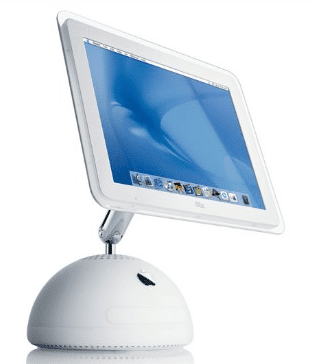
This was cutting-edge technology in 2002
It was fifteen years ago this April when I made the decision to leave employment elsewhere and make my side business my full-time job. Two weeks later, April 15th, was the first day I didn’t go to work for someone else and instead went to work for my clients exclusively. I can still remember the feeling of independence, just like the last day of high school (which was the same day I turned 18), where I was in charge of my own life and I no longer needed to answer to anybody else. Of course, I had no idea what I was getting into at the time and maybe if I had I wouldn’t have done it. No, actually I know I would have still started my own business because the freedom one gets from being an entrepreneur and being in charge of one’s own destiny is worth the hardships.
Fifteen years is a long time, but especially in the technology field, which my whole life has been dedicated to. Looking back fifteen years, I thought about how far technology has advanced. It was spring of 2002. Windows XP and the iPod had just been introduced the previous fall. There was no such thing as the Geek Squad at Best Buy. The Blackberry was still just an oversized pager that only did e-mail. And there was little technology help available for small businesses and individuals. So I made it my mission to help those that were overlooked by the IT firms that claimed they handled “small” business. I also made it my purpose to stay well informed of the changes in the technology industry so that I could help my clients take advantage of the latest technology to stay ahead of their competitors.
Since I have seen so many changes in the technology field since I’ve been in business full-time, I thought it would be fun to look back and make a list of the most important technologies of the last fifteen years. Starting March 31st with my short list of honorable mentions and running through April 15th, the fifteenth anniversary of my first full day in business, I will reveal day by day my list of the fifteen most important technologies of the last fifteen years. Please follow along and reminisce with me on how technology has changed our lives in that time.