
Java Trouble with Chrome Browser
 If you, like many of my clients, use the Google Chrome web browser for accessing web sites that utilize the Java environment, you may have recently started having trouble. Without getting too technical, the simple explanation is that Google has disabled the software interface that add-ons like Java have used to integrate into Chrome and other web browsers. For the time being it is possible to re-enable this interface, which I will explain later in this article. But it should be noted that Google plans to completely eliminate the interface within the year, so it may be worth looking at a different browser if you need to continue using Java going forward.
The main problem with this entire situation is that Google Chrome tends to automatically update itself, so many users suddenly found themselves in trouble without any warning. This situation will likely replay itself every time Chrome updates over the next few months until Google completely eliminates the interface later this year. The question at large is whether Oracle, who currently develops Java, will modify it to work with Chrome at some point soon or if Chrome users who need Java must move to another browser. For Windows users, Internet Explorer still works with Java, but for the long term, Mozilla Firefox may be the best bet since future versions of Internet Explorer (or whatever Microsoft ends up calling it) will also eliminate the software interface that Java currently uses. Chrome users on the Mac platform can also use Safari as well as Firefox.
If changing your browser is not convenient at this time and you want to re-enable the use of Java on your Chrome browser, at least temporarily, simply follow these steps:
- Type
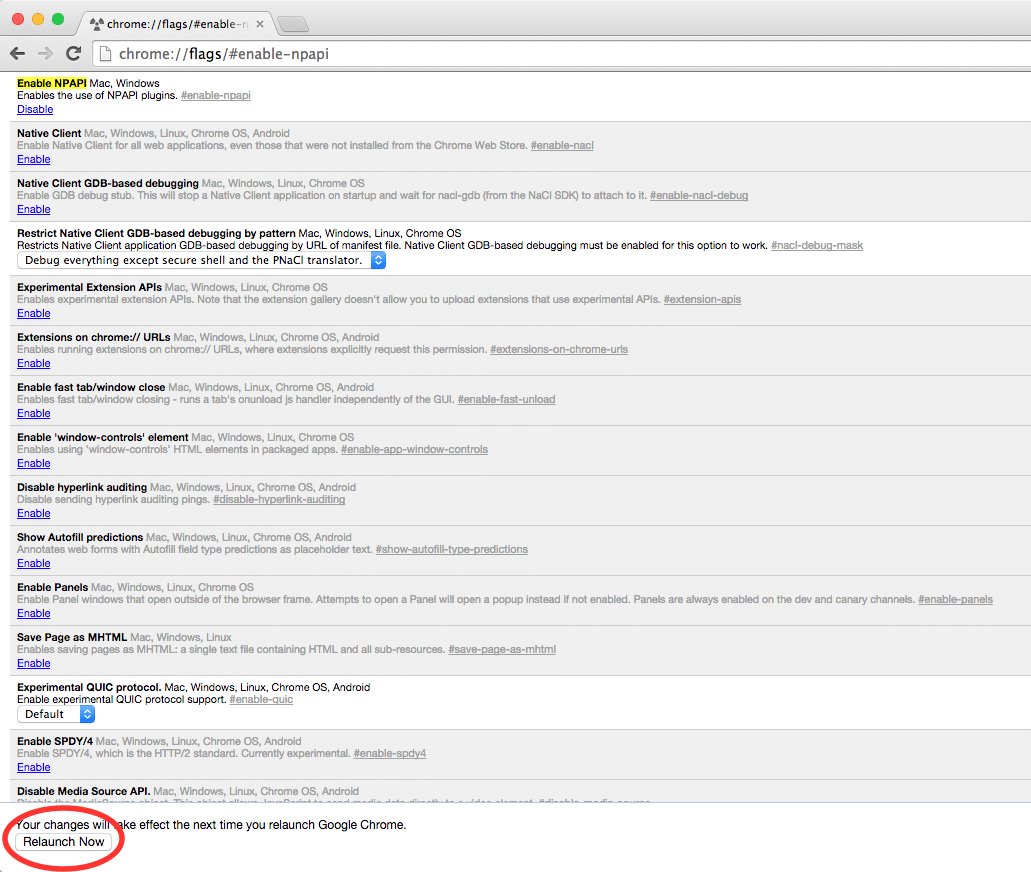
chrome://flags/#enable-npapiin the URL bar at the top of the browser window - Click the Enable link where it says Enable NPAPI near the top of the browser window.
- Click the Relaunch button at the bottom of the browser window.
-

- After entering chrome://flags/#enable-npapi in the URL bar, enable NPAPI

-

- After enabling NPAPI, relaunch Chrome
This procedure should work on either Mac or Windows. If your Java application still isn’t working, this site may be able to help.
If you have questions about the continued use of Java, please do not hesitate to contact me.