
Need a Webcam in 2020?
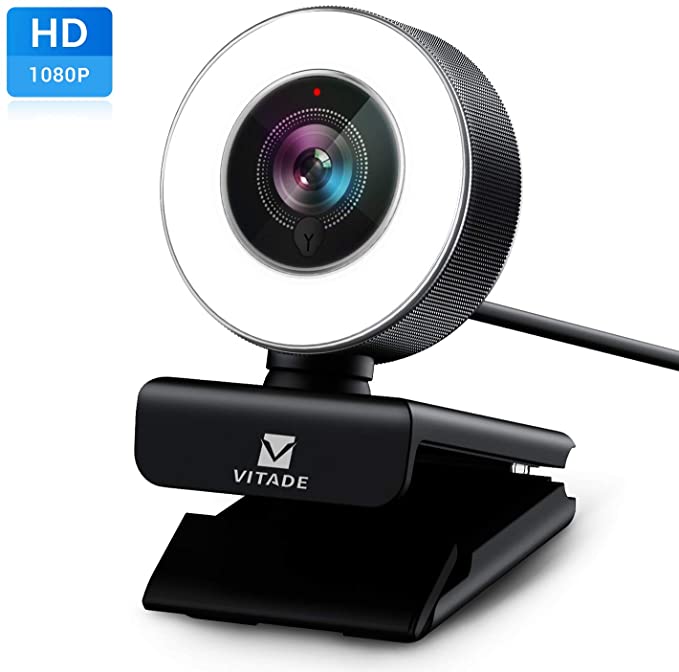 In this year of working and schooling remotely, the demand for webcams have caused supply to become scarce. Most of the reasonably priced devices from well-known brand names such as Logitech have been constantly going out of stock since March. Therefore, people who need a webcam are forced to resort to lesser-known brands. Having been asked recently to research a webcam, I found a good one on Amazon that had good specifications, was highly rated, and offered some good features at a reasonable price. I was so impressed that I went ahead and ordered one to test myself.
After testing it for a couple of weeks on a variety of Zoom calls, including one where I was a presenter for an international summit for entrepreneurs, I am happy to report that this webcam works well and is simple to use. At less than $70, this webcam includes 1080p resolution, a built-in ring light with 3 brightness levels, and works with Macintosh, Windows, and even Linux computers. It mounts to a monitor as most webcams do and feels very stable to me. It also includes a universal mount point for attachments to tripods.
If you are interested in this webcam, here is the Amazon link! If you order one, please comment and let me know your experience with it.
Time to Buy a Smart Thermostat!
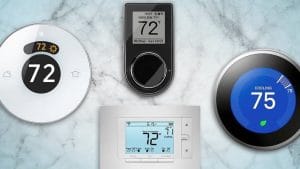 As we ramp up into the summer season, the time is right to think about saving money through the use of smart thermostat technologies. Many people are familiar with the Nest, but devices from Ecobee, Honeywell, and others are making a name for themselves as well.
At the time of this writing, there are sales available for many smart thermostats. For example, the high-end Nest and Ecobee devices are about $250 retail, but both currently are selling for $50 off at stores online as well as brick-and-mortar stores such as Best Buy, Home Depot, and Lowes. That’s 20% off, but many utility companies are also offering rebates when purchasing a smart thermostat. For example, where I live in Illinois, the local utility Ameren is offering a $100 rebate when when purchasing a qualifying smart thermostat. Combining the sale and the rebate nets 60% off! I know there are similar rebates available in Missouri and possibly other states as well. If you have considered a smart thermostat, now is a great time to buy. I know the Illinois rebate is only good through the end of 2019, so I would venture that many other state rebates are similar.
I’ve used a Nest since it originally was introduced and it is a good quality product. However, newer generations of smart thermostats offer improved features and functions. For example, certain models can work with remote sensors that allow for better tracking of the temperature across an entire home, rather than just near the actual thermostat. However, the Ecobee remote sensors also track motion and occupancy of rooms, which then allows for more fine-grained and energy saving management of the temperature in a building. Additionally, the Ecobee and certain Honeywell devices are compatible with Apple’s HomeKit smarthome platform, which makes them better integrated with Apple iPhones, iPads, and Mac computers.
If you have any questions about smart devices such as thermostats, or if you want to find out other ways to save money on your energy bill, please feel free to contact me!
Adventures in Spectrum Mobile – Conditional Call Forwarding
 If you read my recent article, you know that I just switched to Spectrum Mobile service with my iPhone X. Only two days in, things seem to be going well. But I wanted to share one tip for those of you that may use a third party voicemail service (or forward their missed calls to an answering service).
Previously while on AT&T’s service, I had my voicemail set up so that it would bypass AT&T’s voicemail and instead use Google Voice as a voicemail service. This uses a process called Conditional Call Forwarding, of which I’ve written extensively about in the past. This is the same process that one would use if they want their missed calls to go to an answering service. It slipped my mind that when changing wireless phone providers that I would need to reconfigure my service to use Conditional Call Forwarding (CCF) for my Google Voice voicemail. My first thought was that I hoped Spectrum Mobile actually supported this feature, because it is a little obscure for most people. However, because Spectrum Mobile is really just Verizon’s network, I figured that Verizon’s CCF code would probably work.
I looked up Verizon’s Conditional Call Forwarding code and found that it in fact did work with Spectrum Mobile. Later I found that Spectrum Mobile also has a page explaining how to do Conditional Call Forwarding, but they call it “Forward Missed Calls”. It’s the same thing, just different language. To sum up, you basically just dial *71 plus the 10 digit number you want to forward to. So if you want to forward to a phone number of 1234567890, then you would dial *711234567890
Hopefully this article will help people save some time when setting up Conditional Call Forwarding with the new Spectrum Mobile service. If you have any questions on Mobile technology, please feel free to ask!
Adventures in Spectrum Mobile – BYOP/BYOD Early Adopter
 For those of you that aren’t aware (especially those who live near me in the St. Louis metro area – or any other area where Charter/Spectrum Internet service is available), there is a new option available for cellular service. Spectrum Mobile is a wireless service from Charter Spectrum (or just Spectrum … I hate the fact they sort of changed their name and now no one really knows what to call them). To be clear, this service can replace your existing cellular service from AT&T, Verizon, Sprint, T-Mobile, etc. In actuality, Spectrum Mobile uses the Verizon cellular network along with Wi-Fi calling on Spectrum’s network of numerous public Wi-Fi hotspots. I’m sure the first question most of you will have is why use Spectrum Mobile instead of Verizon? If it’s the same network, why bother?
What caught my attention about Spectrum Mobile, as I’m sure it will catch yours, was their price of $45/month for “unlimited” service. Most other wireless companies charge about double this amount for their comparable “unlimited” service, including Verizon themselves. Additionally, if you are a light data user, Spectrum Mobile has a plan that costs $15/month for each gigabyte of data you use. If you generally use less than 2 GB of data a month, you can save even more money. Sounds great, right? I wanted to sign up right away when I first heard about it. But unfortunately, there was one big roadblock.
As I mentioned before, Spectrum Mobile service is new. Really new. As in they just rolled out the service over the summer. Initially, you could not bring your own phone to the service. In fact, you still technically can’t – unless you’re like me and have learned a few things! When I first found out about the service last fall, I was ready to sign up right away – except that I could not bring my existing phone. At that time, you were required to buy a new phone from Spectrum. Having a less than one year old iPhone X, I was not interested in buying a new phone. However, Spectrum reps and information on the Internet all said that the “bring your own phone/device” option (BYOP or BYOD) would be here “soon”. Likely by the end of the year. In fact, at one point in December, Spectrum set up a web page for signing up with BYOP, but then that page was quickly taken down. Likely it was inadvertently published early, but some news sources spotted it.

This web page was up only a brief time before it was taken down in December.
Well the year end came and went and rumors were that Spectrum was testing it in certain areas. As I did more research I found that it was now possible to bring only certain types of phones to Spectrum Mobile and on top of that, only certain Spectrum storefronts could perform the function at this time. The good news for me was that I had a qualifying phone, but the closet store was about an hour away. Luckily I was soon going to an event near one of those stores so I took the opportunity to switch service.
Being that Spectrum Mobile is a new service and that their BYOP option is bleeding edge, I was a little nervous that I would get caught in technology hell. Especially given that I was porting over my existing number from AT&T and that I depend heavily on my phone for business. Yet I felt confident that Spectrum had their stuff together and that I would have no problem with Verizon’s network. Also being a technology professional, I wanted to test out this service as soon as possible and if there were any issues, I figured I could handle them.
The first possible opportunity for problems was in actually signing up for the service. I’ve had experiences with wireless providers both simple and exasperating. I was hopeful the process here would be uncomplicated. I’m happy to report that the process of switching my service over to Spectrum Mobile was relatively quick and painless. The whole process took only about 30 minutes and a few of those minutes were my fault for forgetting my AT&T PIN code and I also spent some time chatting technology with the Spectrum rep. Of course, the process was streamlined for me because I knew I had an unlocked iPhone and I had all my ducks in a row (other than my AT&T PIN!).
Of course, the next opportunity for issues would be in the quality of the cellular service. It’s one thing to switch the service provider, it’s another to actually be able to use the service. I can report that when walking out of the Spectrum store, I had a fully functional iPhone on the Spectrum/Verizon network. Bars were good and I made and received a phone call without issue. Internet speeds seemed solid and I had no negative experience initially. I took a look through some settings on my iPhone and made sure that Wi-Fi calling was enabled. I am sort of surprised, given Spectrum’s marketing, that this option was not automatically enabled or that I was not instructed to turn on this feature in the store. Perhaps the Spectrum rep felt I was technically competent enough to do this and didn’t feel the need to explain it. Not that it is technically necessary as obviously the phone works otherwise on the Verizon network. But it was just something that struck me as odd/interesting.
It’s about two days later and I’ve had no issues with phone calls or data usage on either the cellular network or Wi-Fi. So far so good, but I will keep everyone updated as I spend more time with the Spectrum Mobile service. To sum up, if you want to try Spectrum Mobile and you don’t want to buy a new phone, you must have an iPhone 6S through an original iPhone X. At this time, they are not yet ready to work with the new iPhone XS, XR, or XS Max phones (unless you buy one from Spectrum). Android users are also out of luck at this time (unless, again, you buy one from Spectrum). They will eventually support all types of phones that are compatible with the Verizon network, but again, this is a very early time for their service so they are slowly rolling out and testing these options. Also, you must go to a Spectrum store that is trained on the BYOP option, which at the time of this writing are only the stores in Chesterfield and O’Fallon, MO.
If you have any questions about wireless technology, please feel free to get in touch!
Holiday Tech Toys 2018
 For the 11th installment of my Holiday Tech Toys article, smart home technology continues to be hot. In addition to home automation technologies, I also included a variety of gadgets for use around the house as well. Technology continues to get more personal it seems, which can make gift buying easier but the increasing variety of options can make technology purchasing more confusing! Hopefully these Holiday Tech Toys will give you some ideas for that technology buff in your life!
Wyze Cam
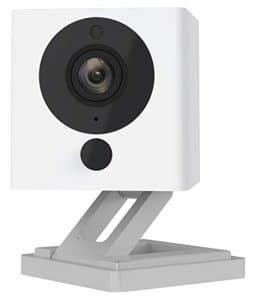 Internet-connected security cameras are a hot item. Unfortunately, for many people the price tags are too high. Enter the Wyze Cam. For $20, this camera can do almost anything that cameras priced 5 to 10 times as much can do, such as night vision and 2-way audio. While it is not perfect and does not integrate with all major home automation platforms, for the price it is hard to beat for the basic functionality that a Internet security camera should provide.
Apple iPad

It is hard to believe the Apple iPad has been around for almost 9 years now. The device that ended the PC era is almost a decade old, yet it still sets the bar that other tablets aspire to. But who are we kidding … there is barely a tablet market outside of the iPad. The iPad is priced lower than it has ever been, starting at $329 for a 9.7 inch 32 GB model. A lot of people have held on to the first iPad they ever purchased, so this may be the year to give them an upgraded model. Make sure to check out the more powerful, larger, but also more expensive iPad Pro models as well. But do note that all iPad models (except the iPad Mini) are now compatible with the Apple Pencil, not just the iPad Pro models.
June Oven
 The June Oven claims to be 7 appliances in one: convection oven, air fryer, dehydrator, slow cooker, broiler, toaster, and warming drawer. But this oven is also Wi-Fi connected and can be controlled by a touch screen or your smart phone. You can adjust the oven settings, watch live video of your food, and be notified when the food is ready. Pre-developed cook programs allows the June Oven to cook anything with little human intervention, up to something the size of a 12-pound turkey. It even claims that the internal camera will recognize your food and automatically cook it for you. That sounds like something out of the Jetsons to me. Now if we only had cars that would fold up into a briefcase …
ThermoWorks Thermapens
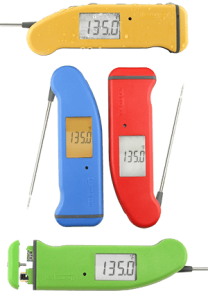
Continuing the cooking theme, the ThermoWorks Thermapen is a line of digital food thermometers that can accurately and quickly measure the temperature of food during preparation. It works on meats, fish, casseroles, re-heated foods, breads, cakes, deep frying and candy. If the June Oven is perhaps a little too much to give as a gift to your foodie friends, perhaps a Thermapen would be perfect.
Roku Express
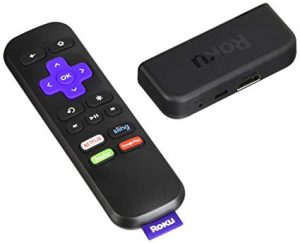 One of the most common questions I get asked is what device should one use to watch streaming video services on an actual TV set. The major contenders are the various models of Amazon Firestick, Google Chromecast, Apple TV, and Roku. While my personal favorite is the Apple TV, a lot of people are looking for a lower priced option. For low cost and simplicity, it is hard to beat the Roku Express. For under $30, the Roku Express works with all the major steaming services (such as Netflix and Hulu) and provides 1080p resolution. It is certainly not a perfect device and more expensive Roku devices provide features such as 4K Ultra HD resolution, but considering the price, the Roku Express is a great gift for those who want to try streaming video. If you are giving it as a gift, try to verify that the person receiving the gift does not have a 4K TV or doesn’t plan to get one soon. I’d recommend a different Roku such as the Roku Streaming Stick+ or Roku Premiere for 4K TVs.

Apple iPhone
The original modern smartphone, the Apple iPhone is still the cream of the crop when it comes to ease of use and reliability. The various iPhone X models (last year’s X, and this year’s XS, XS Max, and XR) are among the most popular Apple has ever sold and the technology in these devices are impressive even to a jaded technology expert like myself. If you are looking to give an iPhone as a gift, make sure to purchase one of this year’s model phones. The lower-cost XR model appears to be selling very well and is a very attractive option to those who want a top-of-the-line iPhone but are willing to save some money in exchange for a screen that uses previous generation technology. Not to say that the screen of the XR model is sub-par, it simply isn’t the cutting edge in screen technology available today. But for many people, they may hardly notice the difference. Also interesting is that the XR model has a slightly larger screen size than the flagship XS model (but smaller than the XS Max).
Belkin Boost Up Qi Wireless Charging Pad
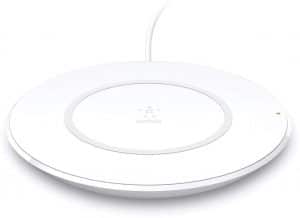 Speaking of the Apple iPhone, one of the features of the iPhone 8 and X series is wireless charging. With a compatible wireless charger, one can charge an iPhone 8 or X series simply by laying it on top of the charger. There are many choices for wireless charging pads, so to make it simple, the Belkin Boost Up Qi Wireless Charging Pad 7.5W is a low-cost option from a trusted brand name. It is optimized for iPhones to support Apple’s “fast charge” feature for quicker charging, but it will work with any Qi-enabled device from Samsung, LG, Sony, and others at normal charging rate. If you have a Samsung phone, you can get the Samsung optimized Belkin Boost Up Qi Wireless Charging Pad version to support its particular fast charge feature, but it is a little more expensive.
Philips Hue White A19
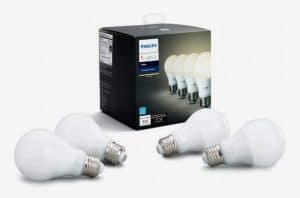
Back to the home automation theme, remotely controlling lights is one of the most popular home automation tasks. The Philips Hue is one of the most popular lines of “smart light bulbs” and the A19 is the most popular/well-known form factors of light bulbs. Currently selling for about $40 for a 4-pack, at $10/bulb the Philips Hue White A19 is a great way to turn regular lamps into devices that can be controlled with any of the major home automation platforms (Apple HomeKit, Amazon Alexa, and Google Assistant). Very important for many people, these bulbs can be set to a variety of shades (warm to cool white) and can also be dimmed. Do note that some features require a Philips Hue Hub device, sold separately.
SENSO Bluetooth Headphones
 Bluetooth headphones have become very popular recently, although the price of many of these devices has not been so popular. Many who desire wireless headphones are people who would use them during a variety of workouts, so their ability to stay secure in the ears while moving and sweating is important. Luckily, the SENSO Bluetooth Headphones are inexpensive, sweatproof, and has many great reviews testifying to stay in place during workouts. This may be a great gift for those workout warriors in your life.
Uvex Skyper Blue Light Blocking Computer Glasses

Finally, one issue with technology usage that has received a lot of coverage in the last few years is the possibility that blue light emanating from screens can be harmful to one’s sleep quality. Many manufacturers of devices now include a “night mode” that changes the color of the light coming from the screen to reduce the amount of blue being seen by the user. But not all devices have this feature so if you are concerned about the amount of blue light you or your loved ones are being exposed to at night, a simple pair of glasses that blocks blue light may be the solution. A very popular and low-cost option is the Uvex Skyper Blue Light Blocking Computer Glasses available from Amazon.
Is Your Old Networking Equipment Making Your Internet Slow?

Slow Internet speeds make even cute kittens angry. You don’t want to anger a cute kitten, do you?
Almost four years ago I wrote an article about high speed Internet services and the inability of some network equipment to keep up. That has been one of my most popular articles ever, generating over 200 comments and questions. Clearly people are frustrated by slow Internet speeds. At the time, the baseline residential bandwidth had been increased to 100 Mbps in my area. Since that time, it has become possible to get 1000 Mbps (gigabit) service in certain neighborhoods in my area and just recently, the local cable provider increased their baseline residential service to 200 Mbps. As such, I felt it was time to revisit this topic.
For many people with older networking equipment, they may not have been getting the full 100 Mbps they were being provided, but they may have been close – say in the 90 Mbps range. But now with 200 Mbps speeds, if they are only getting 90 Mbps, then they are getting less than half of what they are paying for. Even worse, some people with malfunctioning equipment or older wireless technologies may only be getting a fraction of their maximum Internet bandwidth.
I have observed that as routers get older, the possibility of subtle problems increases. Routers that seem to be working fine may not always provide the best possible throughput or they may seem flaky – and maybe only with certain devices! Or they may work fine under light load, but when kids come home and start hammering the Internet with games and streaming videos, then things start going awry. Various network problems also plague small businesses who often will keep older equipment running well past its prime.
The bottom line is that with the prevalence of very high speed Internet services that are 200 Mbps or more, combined with the increased demand for bandwidth from streaming video services and a multitude of mobile devices, now is definitely the time to review your network to ensure you are getting the Internet service speeds you are paying for. Contact a trustworthy technology professional who has expertise with home and small office networks (such as myself!) to review your current setup for problems that may be restricting the speed of your Internet service. In one example, I helped a client increase his usable Internet bandwidth 10x AND made it accessible from every area of his home. It is certainly worth having your network checked out to make sure you are getting the best service possible.
Straight Talk on Meltdown and Spectre Vulnerabilities
 If you pay any attention to technology news, you’ve certainly heard of Meltdown and Spectre. These exploits, both attacking the same core vulnerability, have even received a fair amount of mainstream news coverage. The reason these exploits are receiving so much media coverage is that unlike almost every other computer security issue, the root vulnerability is not located in software but rather in the core hardware of any computing device – the CPU (or more commonly, the “processor”). Practically speaking, because the vulnerability is a flaw in hardware, it is not possible to completely prevent these exploits without replacing the processor. Additionally, almost every processor in every commonly used technology device (computers, smartphones, tablets, etc.) is affected. As bad as this problem sounds, and yes this is a really bad flaw, the practical implications are probably much less frightening for the vast majority of technology users than originally reported.
The first thing to keep in mind is that while the exploits have been given scary sounding names, they are NOT viruses. In other words, there is not an actual attack currently in the wild. So for all the alarms being raised in the media, there is currently no immediate danger. All that was disclosed was the description of the root vulnerability (a security flaw in the design of a CPU’s “speculative execution” feature) and the exploits possible (named Meltdown and Spectre). What the exploits are able to do is read data out of computer memory that is supposed to be protected. Things like passwords and security information that should not be possible to be accessed by ordinary software can be extracted with these exploits.
While the root vulnerability is very serious, actually implementing an attack will require a way to deliver malicious code. In other words, a malware/virus will need to be created to carry out the Meltdown or Spectre exploits. Because any malware attempting to perform a Meltdown or Spectre attack would be able to be mitigated just as any other malware can, standard security precautions should in practice protect most technology users and their data. Additionally, operating system developers have been releasing patches that significantly mitigate the risks from Meltdown and Spectre, making it much harder to actually gather sensitive data with a successful attack. So for systems that have been updated to protect against these new exploits, the risk is greatly reduced. All that being said, however, the disclosure this vulnerability in a key architectural function of the processors we use in all our technology devices should serve as a wake-up call for everyone to review their key security practices.
The key thing to keep in mind is that the more secure your base technology platform is, the more secure you will be from exploits such as Meltdown and Spectre, as well as any malware in general. For example, while the processors used in the iPhone and iPad are technically vulnerable to these exploits, since delivering malware to an iOS device is practically impossible there is almost no risk to these devices. On platforms that are more susceptible to malware (i.e. Windows, Android) continued vigilance to security best practices continues to be an important priority, even more so now.
The bottom line is that for as scary as the Meltdown and Spectre exploits appear to be, they are simply just another vulnerability for criminal malware to take advantage of. True, this particular vulnerability may not be completely fixable until sometime in the future when we are able to purchase new technology devices with redesigned processors, but patches from operating system developers and adequate security precautions should mitigate the risk for most technology users.
Sourced from: http://pcrevive.org/areas-we-serve/computer-repair-lake-worth-fl/
If you have any questions about protecting your technology and data, please don’t hesitate to ask me a question!
Holiday Tech Toys 2017
 Ten years ago I wrote my first Holiday Tech Toys article. Looking back, it is fun to look at the evolution of technology during those 10 years. This year, I decided to focus my tech toys on the rapidly emerging field of home automation. I predict that home automation technology will be one of the hottest tech markets in the coming years and it is poised to make a splash this holiday season. So to help you all out, here are some great home automation products.
Voice Assistant Devices: Amazon Echo Dot, Google Home Mini
 I’m sure you’ve seen the ever increasing number of commercials on TV showcasing the Amazon Alexa and Google Assistant services. You just ask your voice assistant device a question and it gives you the answer! Or you tell it to turn on some lights and it magically obeys your command! Yes, when properly set up a voice assistant can seem like magic. The great news is that Amazon and Google have created small versions of their voice assistants with similarly small prices (especially now during the holiday shopping season). The Amazon Echo Dot and the Google Home Mini each tie into their respective services and with holiday sale pricing both cost just under $30. Apple was set to join the game with their HomePod speaker/voice assistant device but the ship date for that product has slipped to early 2018 and it was also set to cost $399. However, if you have an iPhone, you can use Siri to control your home automation devices just the same. More on that later.
 Ring Wi-Fi Smart Video Doorbell
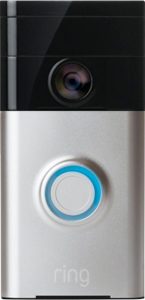 Ring Wi-Fi Smart Video Doorbell
One of the more practical “smart” product lines getting some attention recently has been the video doorbell. It is basically a doorbell with a video camera that can be accessed remotely through your smartphone, whether you are at home or away. It is basically a high-tech peephole that lets you see who is at your door or who may be hanging around your porch area. But you can also communicate with them, which can be very useful if you are not at home and are waiting for a package or if you want to talk to whomever is at your door. You may have heard stories, especially around the holiday season, of people scaring off potential package thieves by interacting with them through their video doorbell systems. The Ring is one of the more popular models and it is currently on sale from most vendors.
ecobee4 Wi-Fi Thermostat with Room Sensor
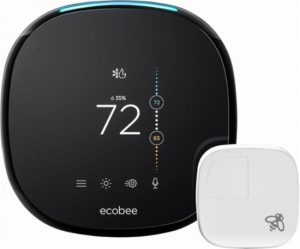 Smart thermostats were one of the earliest examples of the new generation of home automation devices that included Wi-Fi connectivity and smartphone integration. The Nest was the device that kicked it off and is probably the most well-known example of the smart thermostat, but there are others that are worth strong consideration, especially if you are an Apple device owner. I like the ecobee4 because it integrates with Apple’s HomeKit platform (along with Alexa and Google Assistant) unlike the Nest which currently excludes HomeKit integration. But also the ecobee4 also has built-in functionality to set up room sensors around the house which help the main thermostat more accurately control temperatures, saving money in theory as compared to a device that can only measure temperatures in one location.
 iHome iSP6 SmartPlug
 iHome iSP6 SmartPlug
One of the simplest ways to begin automating a home is through the use of smart outlets, such as the iHome iSP6. These devices simply plug into the wall and then any supported device can be automated. Common types of devices include lamps or fans. The iSP6 can control small home appliances up to 1800 watts. I like the iHome iSP6 SmartPlug because it is relatively inexpensive (under $30 per unit, especially with holiday sales), yet it supports the three major home automation platforms (Apple HomeKit, Amazon Alexa, Google Assistant). Other companies are deploying smart outlets are coming into the market that offer similar functionality at similar price points.
Insignia Wi-Fi Smart In-Wall Light Switch
 As I just mentioned, more companies are starting to jump into the home automation market with low cost yet full functioning modules. Best Buy with their Insignia brand are one of those companies. As an example, their Wi-Fi Smart In-Wall Light Switch allows one to replace a regular switch with a smart switch that can be controlled by the three major home automation platforms at a price point under 30 dollars (with holiday sales currently). Smart switches like these can be a great way to automate things like lights without needing to replace every light bulb in fixture, saving money in the long run.
Chamberlain B970 Smart Garage Door Opener

Garage door openers are a very convenient and safety oriented device to have automated. I can tell you from personal experience that it is nice to be able to open or close my garage door from anywhere in the world and also receive alerts if it is left open for a certain amount of time. The Chamberlain Model #B970 is a great example of a fairly low cost garage door opener that has built-in home automation features including Wi-Fi connectivity out of the box. There are also adapters available for existing garage door openers such as the Chamberlain MyQ Smart Garage Hub that offer very similar functionality.
Linksys Velop Wireless Mesh Network
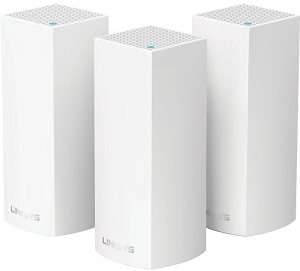 As homes become filled with more and more wireless devices, including home automation devices like the ones I feature in this article, the need for a robust and reliable wireless network becomes even more critical. In the past, some larger or older homes were very difficult to adequately cover with a strong wireless signal. Luckily in the last year, a number of newer generation wireless devices that use a technology called “mesh networking” have been introduced in to the market. Basically, mesh devices create a wireless network that uses multiple wireless access points instead of just one as most wireless routers do. Unlike the “boosters” many people have tried to deploy that generally don’t work very well, mesh devices are designed to create a unified wireless network that covers an entire building seamlessly. In my experience so far, mesh networks work far better than traditional wireless devices at covering larger areas. The Linksys Velop units have gotten very good reviews and I’ve had good luck with them on a handful of deployments recently.
 Apple iPhone X
 Apple iPhone X
For many people, their smartphone is the virtual hub of their home automation system, so including the iPhone X on this list made sense to me. Of course, any iPhone will serve well as a home automation control device, but the iPhone X is Apple’s top tier phone at this time. One thing to note is that while Apple’s entry into the voice assistant device category is delayed, Siri voice control built in to every iPhone continues to work well as a mobile voice assistant. In fact, by using the “hey Siri” functionality, one may not even need a standalone voice assistant if they keep their iPhone near them most of the time. Apple Watch users will also generally have access to Siri on their wrist at all times too.
August HomeKit Bluetooth Deadbolt Retrofit Smart Lock
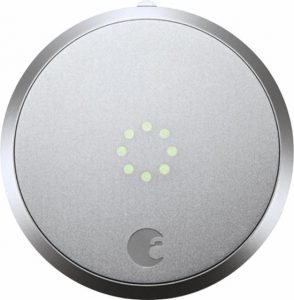 To wrap up my home automation Holiday Tech Toys list, I feature a smart door lock that can be retrofitted onto existing deadbolts. The August HomeKit Bluetooth Deadbolt Retrofit Smart Lock works with the 3 major home automation platforms and can be used to automatically lock and unlock your door. It can automatically unlock as you approach with your smartphone, or your can remotely unlock it using an app or with voice command. You can also assign virtual keys to other people such as cleaning people or pet sitters. Note that you may need an August Connect Wi-Fi Bridge in order to use the remote control features, unless you have an Apple TV 4th Generation device within Bluetooth range of the door lock.
Shop for Tech Gifts Smartly
My general advice for holiday shopping is to purchase from a place that has a good return policy, since it can be difficult to purchase the right technology as a gift. However, also make sure to NOT open the original packaging of a technology gift if there is any chance of it being returned. Once the original packaging is opened, unless there is a problem with the device, returning it simply because the recipient didn’t like it will usually incur a re-stocking fee.
Marcel Brown is the most trusted name in technology. If you need help or have questions about these or any other technologies, please feel free to contact him or post your question in the Q&A section of his website. You may also follow him on Facebook or Twitter.
Five Technologies I’m Thankful For
 As we wind down the year and enter into the holiday season, I figured that in honor of Thanksgiving I would share five technologies I’m thankful for this year. I’d love to hear what you think so comment below with your thoughts and any technologies you are thankful for.
Virtual Assistants: Technologies like Apple Siri, Amazon Alexa, and Google Home are becoming quite mature and robust when it comes to controlling various Internet of Thing devices such as home automation systems and smart appliances. I personally have all three types of virtual assistants in my home because 1) I’m a big geek, and 2) because I want to test them all to be familiar with them. They all work well with the fairly simple home automation setup I currently have and I honestly appreciate how they make my home life easier and more comfortable. Virtual assistant technologies will only continue to grow and evolve in the near future so you may want to begin investigating them if you haven’t already.
Streaming Live TV: This is the year that will go down as the emergence of streaming “live tv” services such as Hulu with Live TV, Sling TV, DirecTV Now, Playstation Vue, and YouTube TV. I can virtually see the crumbling of the old world of broadcast and cable TV before my eyes as I am now able to watch almost all my local channels, the sports teams I care about, and traditional TV channels streaming over the Internet, along with libraries of on-demand movies and TV shows. I will be cancelling my cable TV service shortly and I know other people who are doing the same with their cable or satellite services. The future of video content is streaming and we are seeing it take shape now.
Robot Vacuums: Last summer we got new hardwood floors. We have two cats. Without our trusty Roomba I know our dark hardwood floors would show a ton of cat hair. It runs faithfully every day, keeping the overflow of feline fuzziness under control along with sweeping up the random junk that life brings in the house. Seriously, It does an amazing job of keeping our entire first floor clean and sparkly! I would really miss our Roomba if we didn’t have it.
iPhone X: I honestly didn’t expect to like my new iPhone so much. After all, I’ve seen a lot of technologies in my life and just how different could another iPhone be? Yet I have been pleasantly surprised at just how smooth and seamless my experience has been with the iPhone X. I really enjoy the fact that the phone is not much bigger than a standard size iPhone 6/7/8 but the screen is just as big as a plus sized iPhone (technically slightly bigger) because the screen is edge-to-edge. Face ID works nearly flawlessly for me, the screen is bright, crisp, and richly colored, apps are highly responsive, the phone feels balanced and solid in the hand, and the new button-less interface is surprisingly intuitive. Kudos to Apple for pushing forward the smartphone game, setting the bar everyone else is trying to reach even higher … again.
Wireless Mesh Networks: I’ve only have the opportunity to deploy a few of these new types of wireless network systems this year, but so far the results have been impressive. Basically, a wireless mesh network is just a Wi-Fi network but instead of one access point putting out a signal, they are multiple wireless devices (typically 2 or 3) that are specially designed to work with each other to cover an area as one big seamless wireless network. They are not your ordinary wireless “booster” that often seems to cause more headaches than they solve. With wireless mesh networks Wi-Fi dead zones may be a thing of the past soon, so if you have a troublesome Wi-Fi installation in your home or business let me know and we can discuss a if a wireless mesh system is right for you.
Again, I’d love to read your thoughts on these technologies and any technologies you personally are thankful for, so add your comments below! As well, if you need help or have questions about these or any other technologies, please feel free to contact me or post your question in my Q&A section.
Time for a Security Check-Up
 If the Equifax data breach has taught you nothing else, it should be that any company can be subject to a security compromise if they are not careful. According to news reports, Equifax was breached through a vulnerability that was disclosed and a patch made available 2 months prior to when their system was infiltrated. Given the extremely sensitive nature of the data that Equifax keeps on hundreds of millions of people, waiting at least two months to implement a patch on a vulnerability that serious can only be considered irresponsible at best. However, the relatively simple mistake that Equifax made (not paying attention to the disclosure of a security flaw) is something that many thousands of businesses repeat every single day. It is often only a matter of time before a security vulnerability is exploited for many businesses who do not do their due diligence when it comes to security.
To be sure, most small businesses have much simpler networks and technology systems than a large corporation like Equifax. However, this is no excuse to be lax on security. Many small businesses, especially any in the medical or financial fields, have a lot of information that can be extremely valuable to identity thieves. In addition, any company that works with businesses in the medical or financial industries, as well as those who service governmental agencies, are also vulnerable as their business could be used as a staging point to breach other businesses. Suffering a serious data breach can be fatal for many small businesses so it is certainly worth the effort to make sure that a business has adequate security in place to protect their valuable data, including customer information.
The problem is that most small business owners are not technology experts. How can someone who is very busy running their business and servicing their clients be expected to learn and implement relatively complicated technology security practices? Generally they must rely on either their technology staff or their outsourced technology service providers to do so. Even then, as the Equifax incident has shown, it is possible for technology professionals to fail in their tasks. So what is a small business owner to do? The answer is to have a second opinion on their technology security – i.e. a Security Check-Up.
If you currently have technology staff or an outsourced technology provider, it is in your best interest to review their technology procedures and then have another technology provider perform a security audit to ensure that adequate security precautions are in place. If you are like many small businesses who do not have any professional technology help, then hire a trustworthy technology professional to perform a Security Check-Up as soon as you can!
If you need help with evaluating the security precautions of your business, please feel free to contact me right away. I am currently lining up clients to perform Security Check-Ups for the last quarter of the year so make sure you are protected before a security breach impacts your business.